DailyUploads Premium: Prices, Features & Download Speed
Quick Verdict
DailyUploads is a file-hosting service used to upload, share and download files through individual links. Its archived feature chart lists Premium benefits including no download waiting timer, no download CAPTCHA and a larger daily download allowance.
Our documented Premium transfers showed 12.5 MB/s for one Chrome download, approximately 20.6 MB/s combined across two Chrome downloads, and a graph average of 33.18 MiB/s in JDownloader 2 with four downloads active.
Premium is most useful if you regularly download files hosted on DailyUploads or want to manage several links in a download queue.
On this page
Check DailyUploads Premium Plans
DailyUploads Premium at a Glance
The table below brings together the archived plan information and the speeds shown in our download screenshots.
| Item | Recorded Information |
|---|---|
| 30-day price | $12.99 in the archived pricing material |
| Other plan durations | 90, 180 and 365 days |
| Premium download allowance | 250 GB per day in the archived feature chart |
| Download waiting timer | Listed as none for Premium |
| Download CAPTCHA and ads | Listed as none for Premium |
| Chrome, one file | 12.5 MB/s observed |
| Chrome, two parallel files | Approximately 20.6 MB/s combined |
| JDownloader 2, four files | 33.18 MiB/s graph average; 31.91 MiB/s current speed |
Prices and account limits may change. Check the current plan and checkout details before purchasing. The speed figures describe the captured transfers, not guaranteed performance.
DailyUploads Premium Prices
The archived DailyUploads material lists four Premium durations:
| Plan Duration | Recorded Price | Approximate Cost per Day |
|---|---|---|
| 30 days | $12.99 | $0.43 |
| 90 days | $29.99 | $0.33 |
| 180 days | $49.99 | $0.28 |
| 365 days | $89.99 | $0.25 |
These figures are a price snapshot rather than a current quote. The daily costs are calculated by dividing each recorded price by its plan duration.
Which Plan Should You Choose?
For a first purchase, the 30-day option has the lowest total cost in this price snapshot. It gives you time to check whether DailyUploads performs well on your connection and fits your download needs.
For regular users, longer plans have a lower daily cost. The recorded 365-day price works out to about $0.25 per day, compared with about $0.43 for the 30-day plan.
Choose the duration based on how often you use DailyUploads. Before paying, check the final total, available payment methods and any renewal terms displayed at checkout.
Free vs Premium: What Changes?
The comparison below follows the archived feature chart. Current account limits may differ.
| Feature | Free Access | Registered Account | Premium Account |
|---|---|---|---|
| Pre-download waiting timer | 30 seconds | 15 seconds | None |
| Download CAPTCHA and ads | May appear | May appear | Listed as none |
| Daily download volume | 5 GB | 10 GB | 250 GB |
| Maximum upload file size | 4 GB | 6 GB | 80 GB |
Waiting Times and CAPTCHAs
The archived chart lists a 30-second waiting timer for free access and a 15-second timer for registered accounts. Premium is listed without a waiting timer or download CAPTCHA.
These differences matter most when you download several files. Repeated manual steps can make a queue less convenient to manage.
Parallel Downloads
The Premium test captures show that two Chrome downloads and four JDownloader 2 downloads worked at the same time in their respective tests.
Parallel downloads can be useful for multipart archives or several separate files. The screenshots demonstrate that simultaneous transfers worked during these tests; they do not establish a maximum number of downloads.
Daily Download Allowance
The archived chart lists 250 GB per day for Premium, compared with 5 GB for free access and 10 GB for registered accounts.
Daily traffic and maximum individual file size are separate limits. Check both in the current service information if you need to download large files.
Upload Limits
For uploaders, the archived chart lists an 80 GB maximum upload file size for Premium, compared with 4 GB for free access and 6 GB for registered accounts.
DailyUploads Premium Download Speed
Download speed depends on your connection, network routing, server conditions and the files being transferred. Our screenshots show the following results:
| Test | Observed Result |
|---|---|
| Chrome capture labeled as Free | 2.8 MB/s for a 767 MB file |
| Premium, one Chrome download | 12.5 MB/s for an approximately 1.1 GB file |
| Premium, two Chrome downloads | 11.5 + 9.1 MB/s, approximately 20.6 MB/s combined |
| Premium, four JDownloader 2 downloads | 33.18 MiB/s graph average; 31.91 MiB/s current speed |
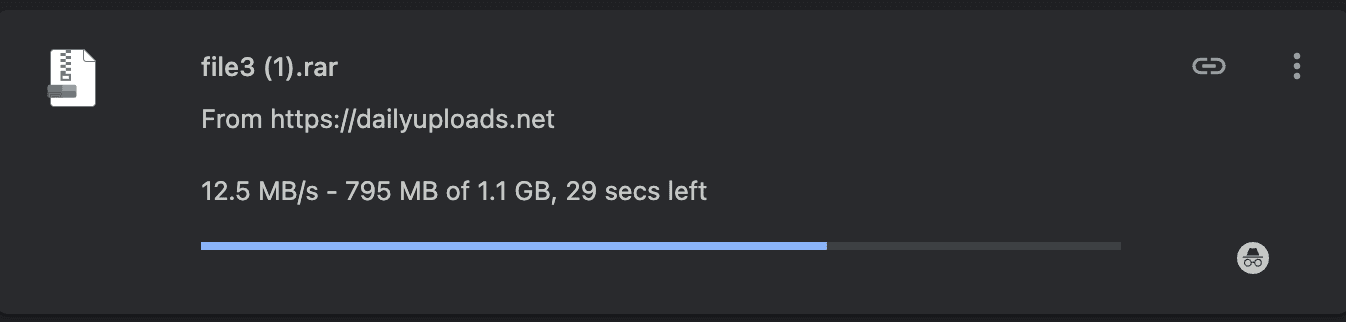
In the single-file Premium capture, Chrome showed 12.5 MB/s with 795 MB downloaded at the time of capture.
The parallel captures showed higher combined throughput. However, the files and transfer conditions differed, so the results do not prove that concurrency alone caused the difference.
Chrome displays speeds as MB/s, while JDownloader 2 displays MiB/s. We preserve the labels and values shown in each application.
See our DailyUploads Speed Test for all four screenshots and detailed notes.
Check DailyUploads Premium Plans
Using DailyUploads with JDownloader 2
JDownloader 2 can help you manage multiple DailyUploads links in one queue. Our documented test showed four active downloads with the Premium account.
To add your account:
- Open JDownloader 2 and go to Settings → Account Manager.
- Choose Add and select DailyUploads from the host list.
- Enter your DailyUploads account credentials.
- Confirm that the account is recognized as Premium.
- Add your links to LinkGrabber and start the queue.
Begin with a modest number of parallel downloads and adjust if needed. More connections do not always produce better results.
Plugin compatibility can change, so check the account status before starting a large queue. Successful downloading in this test does not, by itself, verify every feature such as interrupted-download resume.
How to Buy DailyUploads Premium
Purchases and account activation take place on the official DailyUploads service. This independent guide does not process payments or manage accounts.
- Use the Premium plan link to visit DailyUploads.
- Review the plan durations currently available.
- Check the final price, payment method and any renewal settings.
- Complete the purchase on the official service and check your account status.
For billing, activation or login problems, contact official DailyUploads support. Questions about information on this guide can be sent to info@dailyuploads.info.
Is DailyUploads Premium Worth It?
When Premium Makes Sense
- You regularly need files hosted on DailyUploads.
- You download several files or multipart archives.
- You want fewer waiting timers and CAPTCHA prompts.
- You use JDownloader 2 to manage download queues.
- The current Premium allowance fits your normal download volume.
When Free Access May Be Enough
- You only need an occasional small file.
- Free access is available for the specific file you need.
- You do not mind the waiting timer or verification prompts.
- Your downloads fit within the current free account limits.
The main reason to buy Premium is that it makes your actual DailyUploads downloads more convenient. A larger allowance or lower daily subscription cost is useful only if you expect to use it.
Frequently Asked Questions
How Much Does DailyUploads Premium Cost?
The archived pricing material lists $12.99 for 30 days, $29.99 for 90 days, $49.99 for 180 days and $89.99 for 365 days. Check the official checkout for current prices.
How Fast Is DailyUploads Premium?
Our captures showed 12.5 MB/s for one Chrome download and approximately 20.6 MB/s combined for two Chrome downloads. JDownloader 2 displayed a graph average of 33.18 MiB/s with four downloads active. Your results may differ.
Does DailyUploads Work with JDownloader 2?
It worked in our documented Premium test. Add your account in Account Manager and confirm that JDownloader recognizes its Premium status before starting downloads.
Does This Website Sell or Manage DailyUploads Accounts?
No. dailyuploads.info provides independent information. Purchases, account activation and service support take place directly with DailyUploads.
What Should I Check Before Buying?
Check the files you need, current account limits, final checkout price and renewal terms. Choose a plan duration that matches how often you expect to use the service.
For more account and download questions, visit our DailyUploads FAQ.